Showing posts with label technology. Show all posts

Friday, November 14, 2025

November STEM Challenge

In November, we are going to design free-standing pendulums that can draw or paint as they swing to and fro!

A pendulum is an object, hung from a fixed point, that swings freely back and forth under the action of gravity. The back and forth movements of a pendulum are called oscillations.


(I could watch that sand pendulum allll daaaay 😍)


Kids love to ride the swings at the playground. The motion of a tire swing demonstrates the physics of a pendulum. The swing is supported by chains that are attached to a fixed point at the top of the swing set, which allow it to move freely back and forth. 


The Foucault Pendulum is named for the French physicist Jean Foucault, who used it to demonstrate the rotation of the earth in 1851. It was the first experiment to give simple, direct evidence of the Earth's rotation.

Check out this cool video that explains how the Foucault Pendulum proves the rotation of our amazing planet, Earth. 


Let's design a pendulum!


Research pendulums and use items from around your house to complete this challenge.

Send Mrs. Sol pictures or movies of your experiment to share in class.

DUE DECEMBER 19


Friday, October 3, 2025

October STEM Challenge

This month we are going to design catapults that will FLING autumn-ish projectiles 6 feet or more!

Catapults use weights and levers to send large rocks or other things into the air. They were commonly used as weapons during the Middle Ages. Catapults do not throw as far as modern weapons do and are not useful in modern warfare.


During the Medieval Period, catapults were used as weapons to throw rocks or other things such as hot tar, that would cause damage to something else. Often, catapults were set on higher ground or on castle towers to let them shoot farther. They shot rocks to break castle walls or hot tar to set the target on fire.

Let's design mini-catapults!


Use items from around your house to design a free-standing mini catapult that will launch October themed projectiles farther than 6 feet! Projectiles can be anything related to fall - apples, mini pumpkins, acorns, fall-colored pompoms, Halloweeny stuff, etc.

Send Mrs. Sol pictures or movies of your experiment to share in class.

DUE OCTOBER 18


Thursday, May 26, 2016

Keyboarding


During our conferences this month, a few LCs asked about keyboarding programs for kids. Here are a few that were recommended by teachers and parents.

Keyboarding is a great skill to work on over the summer! The recommendation for elementary students is 15 minutes a day of practice.

When my boys were learning to keyboard. They typed with a box lid over their hands, so that they couldn't look at the keys. This trick helped with speed, memorization and accuracy. Once your student learns the home keys, you may want to try it!

If you have a keyboarding program or game that you like, please let me know and I will add it to the list!

Thursday, May 29, 2014

Project iMovie

Check out the X-cellent commercial Alex created for his Communications class!


Yes, I have a cameo appearance in the video.

I bet you didn't know I could act!


If you would like to make movie to go along with one of your lessons or a novel you read this year, send it to me and I will post it here!

Sunday, December 1, 2013

Weekly Response: Internet Safety

Dearest students,

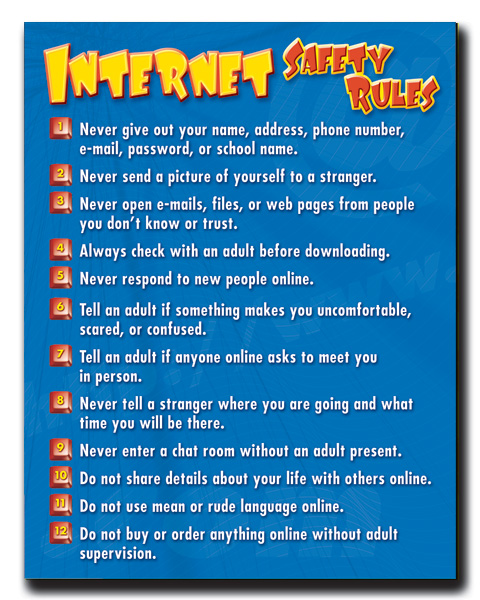
It is always important to be safe when you are using the internet and interactive games like Minecraft and Clash of Clans. If you are ever concerned or uncomfortable about something you see online, tell an adult immediately. 

Here are a few handy guidelines to keep in mind. You can click on the image to enlarge it.

One more thing.

When a box pops up on the screen...

no matter how awesome it is...

DON'T CLICK ON IT without asking an adult!


For more information on internet safety, check out this video on BrainPop.

For this week's response:

Share an internet safety tip with your 
classmates by leaving a comment below.

- or -

Share something you learned about 
internet safety from this post! 

Be safe, my friends.

Wednesday, November 20, 2013

Book Club: Henry Huggins Final Projects!


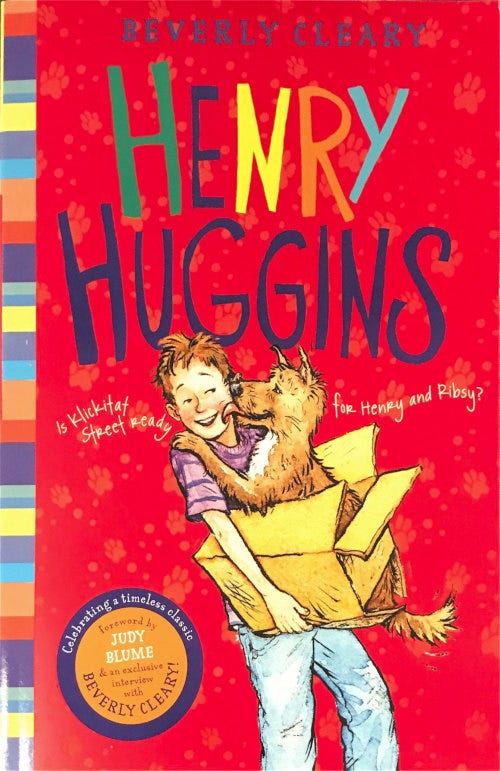
Gee whiz! I can't believe we are finished with our first Book Club book... Henry Huggins by Beverly Cleary! If you would like your final project posted on this site, please send it to Mrs. Sol by November 27. You can find the instructions by clicking the image below.

For the complete Henry Huggins novel study activities and book reflection pages, visit my TpT store!

Next up... Mrs. Frisby and the Rats of NIMH coming your way on December 4!


Check out these awesome Henry Huggins projects! Well done kids!
Please feel free to comment on student work. Click the image to enlarge.
All comments will remain hidden until approved by Mrs. Sol.


By Jillian

By Connor

By Kaylee

By Meagan


Monday, June 3, 2013

If you give a kid an iPad...


...you may end up with something like this.

Be warned! The following preview may cause you to screeeeam like a leeeetle guurl.


Sunday, June 2, 2013

PE + Technology x Creativity = ❤

For an end of the year PE extra credit assignment, I asked students to create a project which tells a little about the course and what they learned. I thought it might be fun to incorporate cool technology sites with a PE and exercise theme. Here is the info sheet and project choices...


Students have until Friday to submit projects, but here are a few I have received so far.


Amazing!

Tuesday, May 21, 2013

Vamp is Blogtastic!


Have you heard the news? Vamp has finally created her very own blog! She is so excited, that she wanted me to share it with you!


If you are in Computer Literacy, you can use Vamp's blog as an example of Assignment 6S. She has everything listed on the assignment check off sheet. She decided to add a few extras, and you can too if you want. You can see the breakdown below.

[click here for a printable copy]


Here is the scoring guide, assignment instructions, and blog privacy info...
[click here for printable copy]

If you would like to see student-created blogs from
first semester, click here. More to come!

Monday, May 6, 2013

Masking Images

In Project 7, my Image Design students were asked to blur the background of an image while leaving the one part of the foreground perfectly clear. They used a technique called "masking" to pull this off. A mask is a special kind of layer that lets you hide or reveal previous layers.

Here is a video to help explain how to create this effect in Gimp...


Check out these student-created samples!
 By Yamilex

By Maria

 By Nick

 By Angela

Amazing work kids! I love the way you created one clear image within the photograph. Keep it up!

Tuesday, April 23, 2013

Image Design Show & Tell

Here are a few samples of student work in our Image Design and Editing course.

First off, students were asked to draw fruit, adding an apple, a banana and an orange to each layer in GIMP. I was not only impressed by the drawing skills my students possess, but by the detail and creativity!

By Malena

By Angela

Next,students put everything they've learned so far to good use. They created funny comics by cutting an image from its background and adding it to a new one. Then, they were to add a speech bubble as well. These were certainly fun to grade. Check them out below!

Moon Doggie...
By Domanin

...or perhaps a karate chop moon man!
By Jeremiah 

Of course there's always the girl 
in the desert with a sweater...
By Megan

...and a little Who-mer.
By Ivy

You guys crack me up!

 Just imagine the possibilities.

More to come!

Thursday, April 11, 2013

GIMP Tutorials

I found two GIMP tutorials that I think my Image Design students will enjoy. The first involves image manipulation, which is used to create a cool 3D photo... starring yourself! The second will come in handy as you make up your comics in Lesson 6.

Photo Manipulation


Adding a Speech Bubble
 
 
I can't wait to see more of your creative GIMP creations this semester!

Saturday, April 6, 2013

It's Never Too Early to Plan for College

There are many colleges and universities out there. Now is the time to see what is available and what you might want to pursue.
For those of you who are interested in science, engineering or scaring... Monsters University may be the place for you!

This just shows what a little creativity, a lot of patience, attention to detail, and computer knowledge can do. 

My cousin Dave is a Technical Director at Pixar, and of all his movies, Monsters Inc. is my all time favorite! Now I'm looking forward to the latest Pixar creation... Monsters University.
Check out the Monsters University website by clicking on the crest above. Then, let me know what you think!

Monday, March 25, 2013

Cover Letters: A Review

This about sums it up.

 Just don't send a fish. 


Please don't send a fish.

Now... on to Section 3: Formatting Text!

Friday, March 8, 2013

Cover Letters


cover letter is a type of business letter that's sent to an employer when you're applying for a job. A cover letter explains to the employer why you want a particular job and what makes you qualified for it.

Cover letters explain your experience and qualifications in detail. The ability to write a good cover letter shows employers that you have strong communication skills.

A cover letter should be less than one page long. It's also important for a cover letter to be single-spaced, clearly written, without errors in spelling, grammar, or punctuation.

Click on the sample cover letter below or view the original at Internship Guides for helpful guidelines. 


___________________________________________________________________

TIPS:
Here are a few cover letter tips from Quintessential Careers:
  • Whenever possible, address your cover letter to a named individual
  • Grab the reader's attention by writing an appealing first paragraph
  • Highlight your three to four key accomplishments/skills/experiences
  • Focus on the fit between your qualifications and the job requirements
  • Whenever possible, relate yourself to the company
  • Never include any negative information
  • End your letter by requesting an interview
  • Mention that you will follow-up your letter -- and then do so
  • Cover letters should be kept to under one page; electronic versions even shorter
  • Avoid all types of mistakes, including typos, misspellings, and grammatical errors
___________________________________________________________________

OTHER RESOURCES:

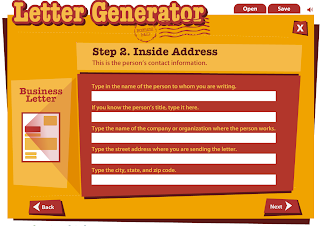
Read Write Think always comes up with fun, interactive tools, such as...


...and...

Check out this handy dandy Resume Generator!


Now, when the time comes to apply for a job, you will be set! I look forward to your cover letters. If you create a resume, I'd love to see that too!

Tuesday, March 5, 2013

Image Design

Now that we are finished with the first "Layers" assignment, I just have to share. My Vamp poster looks silly compared to these AWESOME images. They put mine to shame. (No offense, Vamp).

 By Michael...


By Jacobi...

By Ivy...


 Original by rooster82 // deviant art

By Maria...


Click here for the original post and a 15 minute tutorial on adding layers to your image using Gimp.

Cool, right?